The Consumables Update
Consumables are simpler now: for each bonus, your best one does the work while the rest wait their turn and keep every use. Let Auto-use handle them for you, background trips included, or fine-tune them yourself. Plus Cookpot blessings in uses instead of a 24-hour timer, and 26 consumables with a stronger bonus.
The Consumables Update
Consumables are simpler now. Keeping track of what stacked with what was a lot to think about, and I'd rather that time went to your farm, your trips and your neighbors. So from this update they take turns: for each bonus, your best one does the work, and the others wait with every use kept, including the ones you already have going.
How hands-on you are is up to you. If you'd rather just walk and play, turn on Auto-use and the game takes care of your consumables, background trips included. If you like to plan, Fine-tune lets you choose who works when and save your best for later.
Cookpot blessings come in uses instead of a 24-hour timer, two of them are more than twice as strong, and the Full Ladle costs less. 26 consumables get a stronger bonus, the Workshop is easier to get around, and mastery XP keeps counting past level 10.
Your best consumable does the work
Until now, every consumable you had going added its bonus on top of the others. From this update, for each bonus, your best consumable does the work. The others wait their turn and keep every use.
BonusMore finds
- WorkingForest Medley Tonic+35%8 of 12 uses left
- Next upHearthwood Mushroom Broth+30%12 uses, all kept
- WaitingSnowcap Enoki Broth+25%8 uses, all kept
- Working. Your strongest consumable for a bonus does the work, and its count goes down with each action.
- Waiting. The others keep all their uses. The one marked Next up takes over as soon as the working one runs out.
- Each bonus has its own count. A consumable with two bonuses only uses up the one that's helping. If a stronger XP consumable is working, its XP waits while its step bonus keeps going.
- Waiting for now. A bonus with nothing to add right now (a bite bonus while every cast already bites, or a Quality bonus on a crop planted out of season) waits and doesn't count down.
- Blessings still add on top. Cookpot blessings, villager blessings, race wins, birthdays and gift cakes work on top of your consumables.
Nothing is lost when the update lands. Consumables you already have going keep their uses. Some may show as Waiting at first, if a stronger one covers the same bonus. A note in your mailbox explains it and links to your consumables.
Choosing for yourself
If you like to plan, this part is for you. The game picks your best consumable, but you can always overrule it: in any activity, tap the Consumables pill, then Fine-tune.
- Use first makes a waiting consumable the working one for that bonus. Back to best hands it back.
- Pause takes a consumable off duty in that activity until you Resume it. It keeps every use.
- Order decides who works first: Best first, or Save the best to use up your weaker consumables and keep your strongest for later. It's also in Settings → Consumables.
None of these ever costs a use, and Use first and Pause work on Cookpot blessings too.
Auto-use: let the game handle it
Auto-use is for anyone who'd rather walk and play than keep track of consumables. Turn on Use consumables for me in Settings → Consumables. New players have it switched on as part of the tutorial, and everyone else gets a Turn on Auto-use button in the mailbox note.
When a bonus has nothing working, the game uses a consumable from your bag right before your next action, so that action already gets the bonus. It fills every empty bonus, one copy each, picking your best (or your weakest, if your Order is Save the best). A short message by the pill tells you what it used and which bonus had nothing working.
Auto-use never:
- replaces a consumable that's working
- touches paused ones
- fills a bonus you've paused a consumable for
- uses anything you've hearted in your Bag
- uses anything a quest is asking you to hand in
- buys Cookpot blessings
If it's about to use two or more at once, it asks first: Use them or Not now. Not now holds Auto-use until you leave that place. Tick Don't ask again before Use them to stop the question, and to bring it back, turn on Ask before using several at once in Settings → Consumables.
Your sprinklers and Collection Posts use Auto-use too, just as you would by hand: when a bonus has nothing working, the next plot they water or animal they collect from takes one copy from your bag. The While you were away recap lists what they used. To save your consumables for doing it yourself, switch off Sprinklers may use my watering bonus or Collection posts may use my collecting bonus in Farm Technology.
Tip: heart a consumable in your Bag and Auto-use will always leave it for you.
Background trips
Background trips now use consumables the way you would by hand with Auto-use on: when a bonus runs out partway through, the next copy comes from your bag. A 150-run mining trip can be covered from start to finish, as long as your bag holds enough.
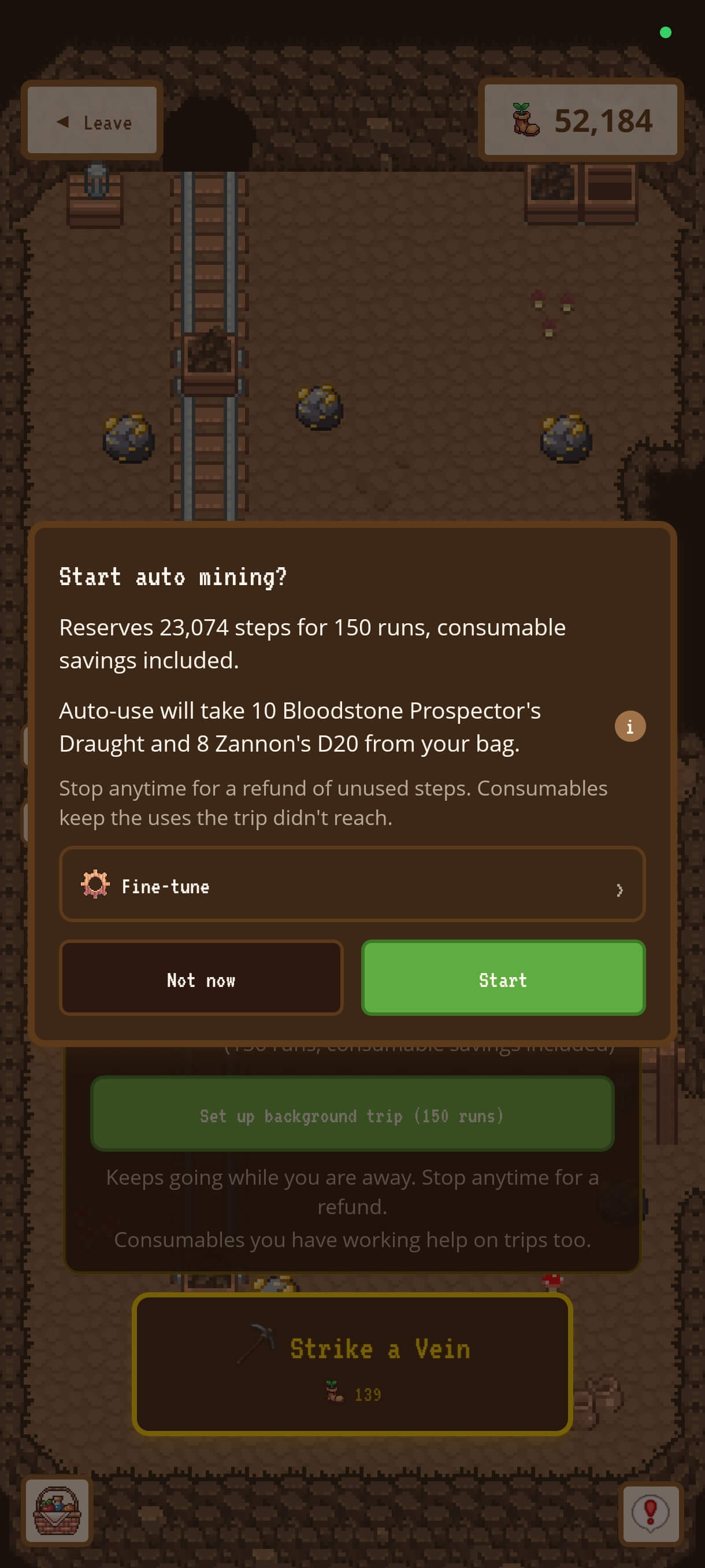
- The button now reads Set up background trip (N runs) and opens the trip screen first. Nothing starts until you tap Start.
- The trip screen says what the trip will take before you start, for example "Auto-use will take 10 Bloodstone Prospector's Draught and 8 Zannon's D20 from your bag." The trip never takes more, or charges more steps, than it showed.
- With Auto-use off or paused, one tap on Use my best consumables fills the trip for you.
- Fine-tune (folded away by default) shows which runs each bonus covers and lets you change how many copies of each stack come along. Reset puts it back. In Fine-tune, Fill the trip offers Best first or Save the best, for a trip where you'd rather use up your weaker consumables.
- Stop anytime: unused steps are refunded, and consumables keep the uses the trip didn't reach.
- The results show how many runs each consumable covered for each bonus, and how many steps your consumables saved.
Seeing what's working
The screens around consumables were rebuilt to show more and say less. Short explanations sit behind an "i" wherever you might want one.
In an activity
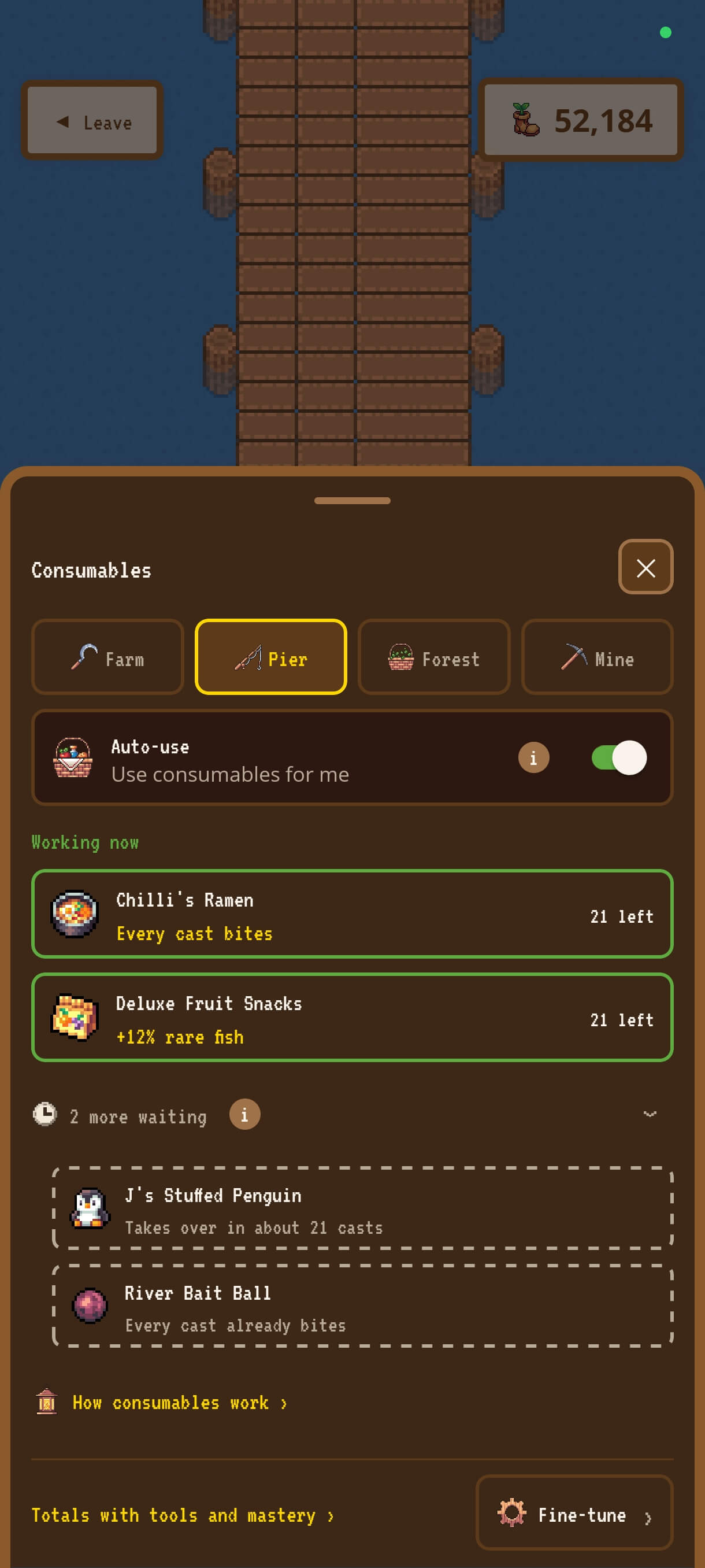
- The Consumables pill. In the farm, pier, forest, mine, coop and barn, a pill shows the icons of what's working right now. Tap it for the Consumables sheet: who's working, who's waiting, and anything that can't help here. Fine-tune holds the choices above.
- Counts on screen. Turn on Settings → Display & Detail → Show consumable counts on screen, and chips by the pill show how many uses each working consumable has left.
- Short messages by the pill when something takes over, runs out or is used by Auto-use.
When you pick one
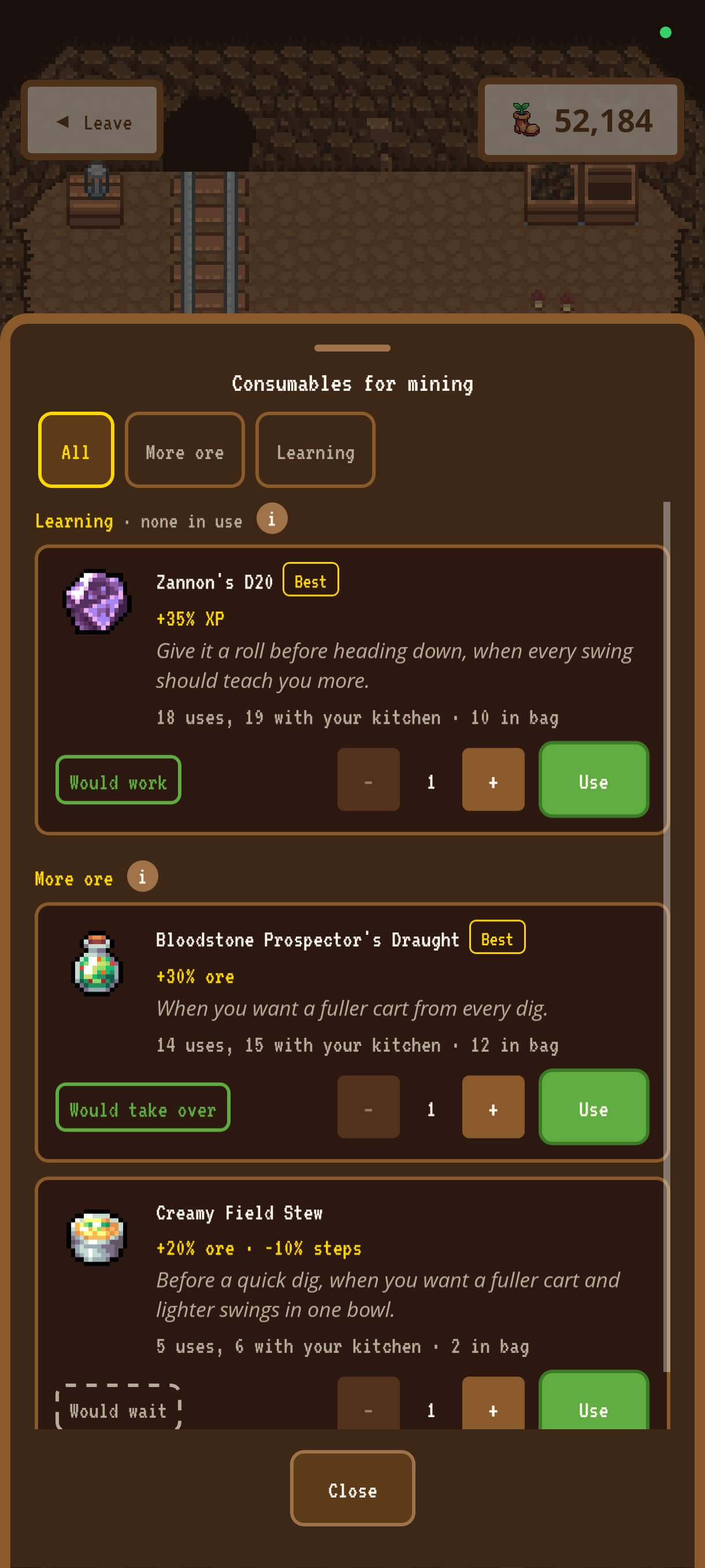
- The picker groups everything by what it does: More ore, Fewer steps, XP and so on, each with an "i" that explains the bonus in a sentence.
- Best marks your strongest. Tags tell you before you tap what one more would do here: Would work, Would take over, Would wait or Can't help here.
- The picker stays open, so you can use a few in a row.
- During a festival, in the place it counts, groups that help it are tagged Best here, Helps here or Limited here.
In your Bag
- The Bag card is shorter: each bonus with its icon and value, and how many uses a copy gives (your kitchen's extra use included). The "i" holds the rest: when to pick it, what higher qualities give, and its description.
- When you use one from your Bag, the game first shows each of its bonuses as Works now, Waits or Can't help here.
- While a consumable is in use, the card says where, and a tap opens the Consumables sheet for that activity.
- Quality shows. Silver, Gold and Pristine copies have always given a stronger bonus. Now the Bag card's values are for that copy's quality, and its "i" shows what a Gold or Pristine copy would give.
Cookpot blessings
Cookpot blessings now come in uses instead of a 24-hour timer, so there's no rush to spend your steps before one fades. The Emberpace Blessing and Hearthlight Lessons are also more than twice as strong at every stage, the Full Ladle costs less, and the Cookpot's Rewards tab is now called Blessings.
- One Buy gives 30 uses in each activity the blessing helps. Buy the same stage again for 30 more, up to 90.
- Buy any stage straight away. No more climbing from I to II to III, and no starting over when one runs out.
- Blessings work on top of your consumables. Two stages of the same blessing don't add up: one works, and the other waits with its uses (it shows as Waiting).
- The shop shows it at a glance. Each stage has its value, a meter of how much you hold (one segment per Buy) and its price. When a stage can't take another 30 uses anywhere, its button says Full.
- A blessing still burning when the update lands turns into uses at its new strength: 30 for every 24 hours it had left, counted by the hour (12 hours left becomes 15 uses).
Here's each stage, with its price in Hearth Tokens.
| Stage I | Stage II | Stage III | |
|---|---|---|---|
| Emberpace BlessingFewer steps, every activity | |||
| Bonus | 2% to 5% | 4% to 10% | 7% to 15% |
| Price | 50 | 150 | 375 |
| Hearthlight LessonsMore XP, every activity | |||
| Bonus | 4% to 10% | 8% to 20% | 14% to 30% |
| Price | 60 | 180 | 450 |
| Full LadleFiner quality in fishing, mining, foraging and harvests | |||
| Bonus | 10% | 20% | 30% |
| Price | 70 to 50 | 210 to 150 | 525 to 375 |
A clearer Workshop
The Workshop used to open on one long list of every recipe you'd unlocked, up to about ninety. Now it opens on a front page, and you go from there.
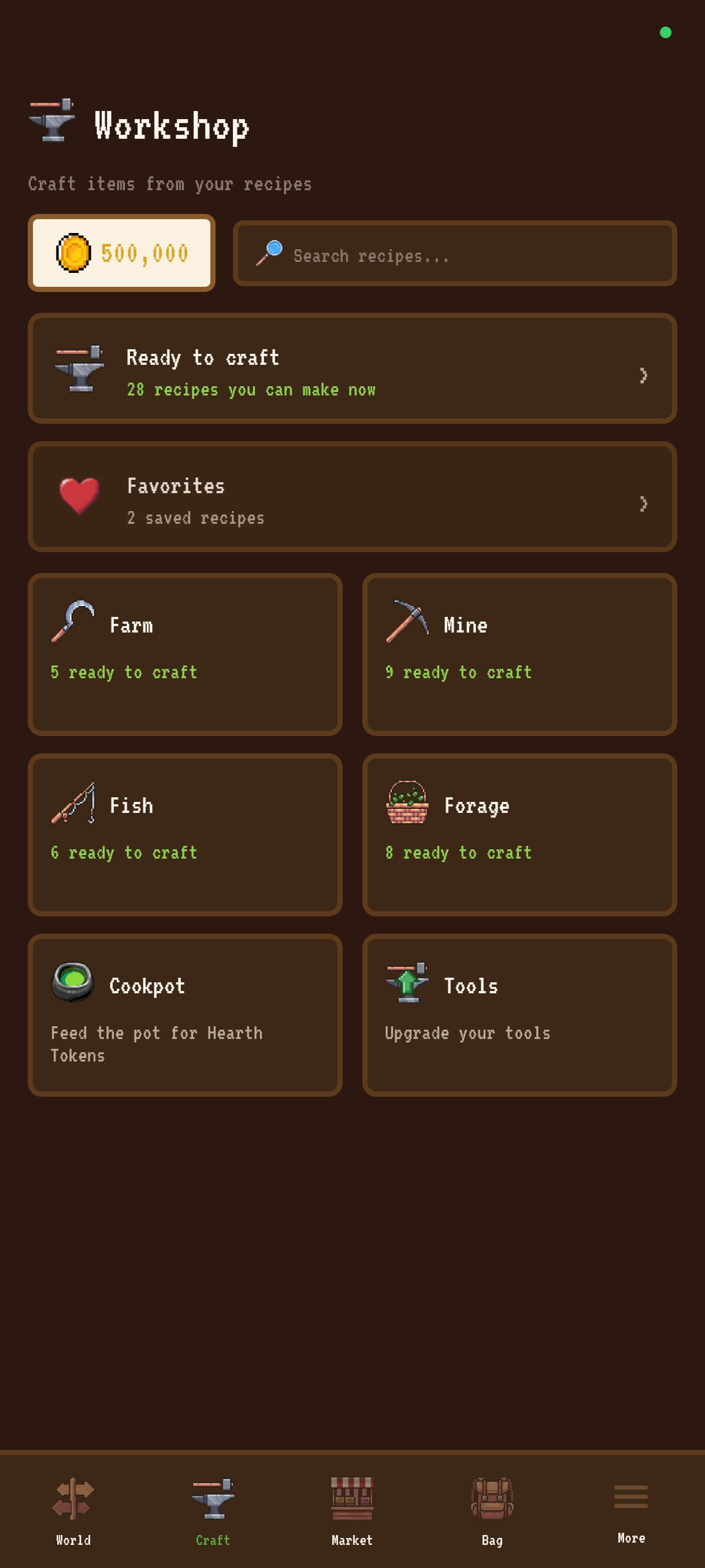
- The front page has Ready to craft (with a count of what you can make right now), your Favorites once you've favorited a recipe, and six sections: Farm, Mine, Fish, Forage, Cookpot and Tools.
- Farm, Mine, Fish and Forage each list what's ready to craft first, then what isn't ready yet, then kegs and materials.
- Bonus filters. On a section page, tap a bonus (Fewer steps, More ore, XP...) to see only the recipes that give it. The strongest come first, and each card shows that bonus at the front of its line.
- Recipe cards now count your kitchen's extra use in how many uses a copy gives.
- Still locked. At the bottom of Farm, Mine, Fish and Forage, a folded list shows every recipe you haven't unlocked yet and how to get it: the level you need, the hearts with a villager, the quest to finish or the achievement to earn. Closest first.
- Search still finds any recipe you've unlocked, from anywhere in the Workshop.
Retuned consumables
26 consumables get a stronger bonus with this update, and none gets weaker. Only More ore, More finds, More crops, XP and Rare fish change. In each, the strongest stays where it is, and these 26 move up, most of them by 5 points (+25% to +30%, say). Gure's Dolly gets the biggest jump, from +10% to +35%. Where a consumable's uses go down, each copy still gives at least as much bonus in total as before.
| Consumable | Bonus | Uses per copy |
|---|---|---|
| Aurora Crystal Apex Elixir | More ore, More finds and More crops+40% to +45% | 4same |
| Autumn Harvest Bake | More crops+25% to +30% | 10same |
| Bloodstone Prospector's Draught | More ore+25% to +30% | 16 to 14 |
| Celia's Gift of Devotion | Rare fish+6% to +8% | 15same |
| Everbloom Elixir | Watering XP+25% to +30%More crops+25% to +30% | 16same |
| Forager's Snack | Foraging XP+25% to +30% | 10same |
| Forest Medley Tonic | More finds+30% to +35% | 12same |
| Ghost Mushroom | Foraging XP+25% to +30%More finds+25% to +30% | 10same |
| Gure's Dolly | Harvest XP+10% to +35% | 5 to 4 |
| Harvest Feast Pie | More crops+15% to +20% | 16same |
| Hearthwood Mushroom Broth | More finds+25% to +30% | 12same |
| Jade Wildgather Draught | More finds+40% to +45% | 16 to 15 |
| Legendary Catch Feast | XP in every activity+25% to +30% | 5same |
| Loamcake | More finds+25% to +30% | 8 to 7 |
| Miner's Snack | Mining XP+25% to +30%More ore+25% to +30% | 10 to 9 |
| Nature Blessing | More finds+15% to +20% | 8 to 6 |
| Premium Compost | Harvest XP+25% to +30% | 6same |
| Primeval Pollen | Foraging XP+30% to +35% | 16same |
| Prospector's Trail Mix | More ore+20% to +25% | 10same |
| Ruby Motherlode Elixir | Mining XP+25% to +30% | 24same |
| Sinful Delight | Harvest XP+40% to +45% | 30 to 27 |
| Snowcap Enoki Broth | More finds+20% to +25% | 10 to 8 |
| Sprout Tonic | Watering XP+15% to +20% | 10same |
| Summer Wildflower Tea | More finds+25% to +30% | 10same |
| Worldfeast | More ore, More finds and More crops+40% to +45% | 6same |
| Zannon's D20 | Mining XP+30% to +35% | 20 to 18 |
Mastery past level 10
At mastery 10, your XP now keeps counting. Your profile, the side menu and the mine, pier and forest screens show how much XP you've earned toward level 11.
- XP bonuses count too, so XP consumables and Hearthlight Lessons still pay off at level 10, and Auto-use fills an empty XP bonus there like anywhere else.
- Levels past 10 aren't here yet, but they're next, and the XP you earn from now on counts toward them.
Crafted item prices
Most crafted items now sell at the store for what their ingredients would: same quality in, same quality out. For most of them that's more than before, and for a few it's less. A few festival prizes keep their current price.
- The quality of what you craft follows what your ingredients are worth. Each ingredient counts by what it's worth, so your most valuable ones count the most. A mix of qualities rounds down, and your kitchen's chance of a finer result stays.
- One earthworm makes one Basic Bait (it used to make five).
- Chalk, mudstone, pumice and soapstone sell for more.
Smaller changes
- Your bonuses shows multipliers as percentages (+150% rather than x2.5).
- Messages now show inside the mine and at the pier, where they used to be hidden.
- On Android, Back closes an open picker first.
- Pristine finds in trip results use a lighter purple that's easier to read.
Tell me how it feels
That's the consumables update. The aim is less to keep track of and more room for the rest of the game, whether you plan every bonus or never open Fine-tune. It changes something you use every day, so tell me how it feels once you've had a few days with it, over on Discord. I read every message.